Encrypt data securely by using pictures

If you're worried about the safety of your documents you should start using some encryption method to protect them.

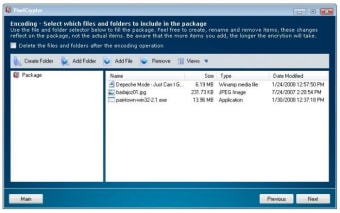
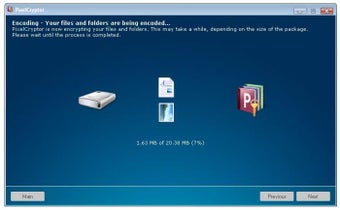
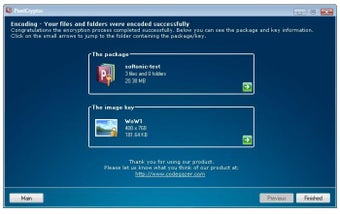
PixelCryptor is probably one of the best options for your first steps into encryption. It enables you to protect your private documents by combining them into a package that is then encrypted with any photo of your choice.

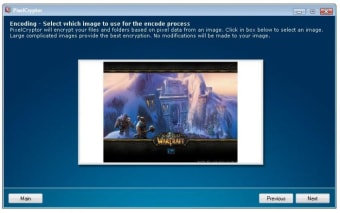
The pixel data contained in this photo is what the program uses to protect your documents, by creating almost endless, hacker-proof combinations. And whenever you want to decrypt your documents, simply open the package with your documents and select the picture you used to encrypt it.

PixelCryptor may not offer as many security options and encryption methods as other tools, but it's very easy to use and probably the best choice for encryption newbies. On the downside, anyone who you're sending encrypted data too will need to have it installed.

PixelCryptor is a fairly basic encryption tool, mainly addressed at novice users, which uses images to encrypt confidential data.

Changes

Improved: Enormous speed boost in encoding/decoding Improved: Better memory management Fixed: Bug fixes related to the file view Added: New installation process Added: Help file included


  • Pros

    • Very easy to use, especially newbies
  • Cons

    • No encryption options
    • Requires having the program installed to decrypt data

 0/5

App specs

  • License

    Free

  • Version

    1.2

  • Latest update

  • Platform

    Windows

  • OS

    Windows XP

  • Language

    English

  • Downloads

    12K

    Last month's downloads

    • 20
  • Size

    3.35 MB

  • Developer

    • Codegazer

Program available in other languages


User reviews about PixelCryptor

3.9

1 reviews

Add review

Main reviews for you

  • Anonymous user

    I Like this Program. i really lije this program its easy and useful . thanks

More

You may also like

Alternatives to PixelCryptor

Explore Apps

Latest articles

Laws concerning the use of this software vary from country to country. We do not encourage or condone the use of this program if it is in violation of these laws.
Softonic

Is PixelCryptor safe?

Score result: Clean

This file passed a comprehensive security scan using VirusTotal technology. It is safe to download.

  • Virus free
  • Spyware free
  • Malware free
  • Verified by Security Partners

    VirusTotal logo

Scan Info

Last scan
Wednesday, December 2, 2020
Scan provider
VirusTotal

Softonic security commitment

PixelCryptor has been thoroughly scanned by our advanced security systems and verified by industry-leading partners. This file comes from the official developer and has passed all our security checks, showing no signs of viruses, malware, or spyware. For more information, visit our Security and Trust Center